About AstroConnexions for iPhone
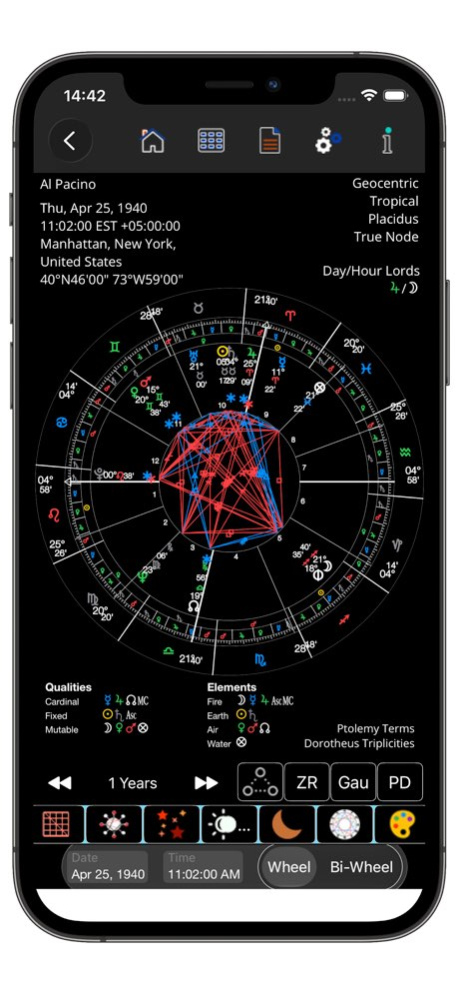
AstroConnexions for the iPhone has a unique and powerful design that makes astrological charting a breeze. For beginner and professional alike. Explore the world of astrology! It's never been easier. Designed for iPhone,...
AstroConnexions for the iPhone has a unique and powerful design that makes astrological charting a breeze. For beginner and professional alike. Explore the world of astrology! It's never been easier. Designed for iPhone, iOS 17+. ++ Dedicated website (astroconnexions.com) with searchable Knowledge Base. Articles for beginners, support, FAQ, etc. ++ Charts: * Natal charts, incl horary, historical etc * Solar and Lunar Returns - with relocation and/or precession-correction * Transits. Transit relocation. * Secondary progressions (by Naibod RA or Long, or Quotidian. Progress MC by Solar Arc in long) * Solar Arc directions (by Naibod RA or Long) * Synastry - relationship (comparison and composite) * Antiscia * Annual Profections * Zodiacal Releasing from Spirit/Fortune * Midpoint Trees * Pre-Natal Syzygy" * Eclipse - Solar and Lunar * Ingress - all major planets, inc Solar and Lunar * Gauquelin Sectors * Sidereal with Ayanamsha settings * Heliocentric * Snapshots - transit, sec. prog, solar arcs. * Solar Charts (Sun on Asc) * Draconic Dark Mode supported. New, Edit, and Save charts. Extensive time zone and geographical database. Use a map to choose lat and long. Use your current location for all new charts. Old Style (OS) dates. New Style (NS) dates. LAT and LMT handled. Over 400 charts provided. Chart notes. Terms (Ptolemy/Egyptian/Chaldean) and triplicities, Decans. Graphs for Qualities and Elements Essential dignities and debilities. Day and Hour Lords. Full set of aspects, incl. bi-wheel aspect lines e.g. progressed to natal. Traditional table of aspects. Midpoint trees. Variety of ways to view aspects by table record. User definable aspect orbs. Moon’s applying aspects can be viewed individually on the chart. Antiscia aspects. Midpoint aspects (Uranian). Show midpoint aspect lines. House Systems: Placidus, Regio, Whole-sign, etc. House Numbers. Single and bi-wheels for transits, progressions, directions SR and LR. Bi-wheel for synastry. Chart animation: Go forward or backwards in time. Choose the step interval: 1-20. By Years, Months, Days, Hours, Minutes, Seconds. Chart Listing: Easily find a chart including search ability. Order chart list by name or most recent created date. Filter by natal, horary comparison or composite charts. Filter by category. New, Edit categories. Aspects: Sort by orb, applying, planet, aspect Filter by All, Traditional, Traditional + traditional aspects, antiscia, Midpoint. Display user-selectable aspects lines, eg shown only hard aspects. Show aspect lines or not. Import Charts: Import charts from Solar Fire (Windows) via DropBox. Import Quick*Charts. Import SFcht charts. Export Charts via Dropbox. Batch export. Speculum: Long,, Lat, Declination, RA - Air print (inc aspects). Fixed stars: Prominent fixed stars are shown on the chart. Details available from fixed stars pop-up table. User-defined fixed star prominence. Charts can be coloured to individual taste, including fills. Many colour themes available too. True or mean Lunar Node Lots: Fortune Spirit Eros (Love) or Part of Marriage (Frawley) Necessity Courage Victory Nemesis All parts can be configured for day or night, or fixed POF and POS can be configured as per Frawley for SR and LR charts Moon’s aspects Opening the moons aspect table immediately removes all other aspect lines. This allows you to concentrate on the moon’s aspects Clicking on a record highlights that aspect line by removing all other aspects lines Provided Charts Hundreds of Charts (from Astro Data Bank) provided with Rodden rating. Arranged in groups such as Crime, Politics. Antiscia Antiscia aspects for all charts Bi-wheel Antiscia Charts from Natal Extra Points and asteroids Vertex, East Point, Lilith, Selena Ceres, Pallas, Juno, Vesta Makemake, Sedna, Haumea, Eris. Primary Directions + more ..... see web site https://astroconnexions.com
Version History South node does not display when sidereal option is selected for natal and comparison charts: fixed 2.02 Jul 14 Every chart can have its own modified text interpretations (if required). Affected modules/routines: Speculum – Modern Interpretations Extended Notes – Auto insert Interpretation text. Improved routine. Assign your previously saved (prior to AC for the iPhone Ver 2.0) Interpretations to a user-selectable chart To do: tap Interpretations and assign a chart to the previous unassigned interpretations – this can only be done once. Added to In-Houses: Uranus, Neptune and Pluto text interpretations. Scroll to view. Fix for incorrect auto-assignment of modern aspect interpretation for Extended Notes. Fix for missing icons (Ok and Cancel) for Extended Notes for Add a Note view: Some UI fixes. 2.01 Jul 11 AC supports iOS 26+ Extended Notes: improved, updated: Added Auto Save, Eclipse. Sync Qualities and Elements display with Settings. Many UI updates. 2.0 Jul 4 More accurate results for exact aspect date for Secondary/SA Asc and MC aspects to planetary positions/points. Long Press Aspect Table – for bi-wheels. 1.44 12/19/2025 Added to Primary Directions: Terms | Directions | Terms + Directions. Terms: Direct Only, if selected. For outputs to the Results table. Terms only zodiacal. Terms output conj only. Directions: any aspect. Terms: Direct Only applies only to Terms and does not affect Direct/Converse for Directions. Note conj to Asc is opposite to desc. 1.43 12/09/2025 Bug: Primary Directions - calculating Asc through the Terms - might miss a term if POF is shown in the chart. Removing POF from the chart fixes the problem. Bug fix - showing POF in the chart now OK for PD Asc through the terms. iPhone 11, iPhone 11 Pro Max - main view. The text on the right-hand side is now correctly lined-up, and the chart fills the screen. 1.42 11/22/2025 Designed for and supported by AC: iPhone Air. All iPhone 17 models now supported. 1.41 10/31/2025 Designed for and supported by AC: new iPhone 17 models; iPhone 17 Pro Max √ iPhone 17 Pro √ iPhone 17 √ iPhone Air - available soon Bug fix: Moon's aspect table - corrected slightly obscured top row. 1.40 10/28/2025 Antiscia aspects, including Contra-Antiscia, for Zodiacal and Mundane Primary Directions, Placidus semi-arc. Direct and Converse. Tropical and Sidereal. Traditional planets, inc Uranus, Neptune, Pluto, Nodes, Parts. Rectification. 1.39 09/17/2025 Bug Fix: Horary chart Day/Hour Lord might not be changed correctly if time reset. 1.38 09/09/2025 Added Export AC charts via Files App - left swipe a selected/current chart record in Your Charts table. Dropbox not required. Added Import AC charts via Files App. Dropbox not required. 1.37 08/24/2025 Added set time to Now - Time Button. 1.36 06/28/2025 Import Solar Fire Gold (Windows) and Astro Gold (iOS) chart files – .SFcht via iOS Files app. 1.35 06/19/2025 Primary Directions. Placidus semi-arc zodiacal, fixed stars as promissors. 1.34 06/13/2025 Some code improvements. 1.33 05/29/2025 Bug Fix: Primary Directions Promissor and Significator fix for South Node – tropical and sidereal. Bug fix: Primary Directions Sidereal fix for Arabian Parts. Apple Maps bug fix for Ukraine. Dissociate aspect recognition. Settings - Aspect Table settings: top right icon. The background of the out-of-sign aspect record is automatically set to light red in the Aspect Table. Added sort to Primary Directions results Print View 1.32 05/26/2025 Primary Directions - Placidian semi-arc mundane aspects of promissors to significators. 1.31 05/02/2025 Primary Directions: Bianchini method of ascribing latitude to aspects. Six app Theme light colours added. Bug fix: Duplicate chart name alert - keyboard prevents acknowledgement. Chart: Connecting Lines – on/off. The very small lines that connect a planet to the zodiac circle. Chart Listing: Import image into YourCharts for Natal charts. Swipe left on a Natal chart record in Your Charts table. Qualities/Elements (bottom of chart) - show or not - saved to AC's database. 1.30 04/19/2025 Planets/Points in signs – interpretation text table – editable. Import text. Planets/Points in houses – interpretation text table – editable. Import text. Similar to the Modern Aspect Interpretations table. For planets/points in signs: Sun to Saturn, Aries to Pisces. including Chiron, North Node, South Node, Asc, MC For planets/points in houses: Sun to Saturn, house one to house twelve. including Chiron, North Node, South Node. Five degree rule can be applied when viewing in the Speculum. Viewable in Speculum Aspects Tab. Settings are saved. 1.29 03/12/2025 AC designed for iPhone 16e Speculum fix for All. 1.28 03/02/2025 Import plain text into Modern Aspect Interpretations table. 1.27 02/04/2025 Modern Interpretations - refresh table - improvement after Saving an edit. 1.26 01/29/2025 Bug fix: chart aspect lines not drawn under certain circumstance. 1.25 01/29/2025 New drop down menu for: 1. Speculum 2. Extended Notes 3. Aspect interpretations View and Edit: Modern aspect interpretations Extended Notes (editable) for Aspects, Ingress. Auto Modern Aspect Interpretation text insertion. Get Exact Aspect if Modern Interpretations is selected. For Aspect table, bi-wheels. 1.24 01/29/2025 Improved Aspect Table routine for eclipse aspects. 1.23 01/19/2025
Previous Versions
Here you can find the changelog of AstroConnexions for iPhone since it was posted on our website on 2024-11-20 11:20:10.
The latest version is 2.02 and it was updated on 2026-10-07 02:20:06. See below the changes in each version.
AstroConnexions for iPhone version 2.02
Updated At: 2026-10-07
AstroConnexions for iPhone version 1.44
Updated At: 2025-12-19
Changes: More accurate results for exact aspect date for Secondary/SA Asc and MC aspects to planetary positions/points. Long Press Aspect Table – for bi-wheels.
AstroConnexions for iPhone version 1.36
Updated At: 2025-06-28
Changes: Jun 28, 2025
Version 1.36
Added set time to Now - Time Button.
AstroConnexions for iPhone version 1.33
Updated At: 2025-05-29
Changes: May 29, 2025
Version 1.33
Some code improvements.
AstroConnexions for iPhone version 1.31
Updated At: 2025-05-02
Changes: May 2, 2025
Version 1.31
Primary Directions - Placidian semi-arc mundane aspects of promissors to significators.
AstroConnexions for iPhone version 1.30
Updated At: 2025-04-19
Changes: Apr 19, 2025
Version 1.30
Primary Directions: Bianchini method of ascribing latitude to aspects.
Six app Theme light colours added.
Bug fix: Duplicate chart name alert - keyboard prevents acknowledgement.
Chart: Connecting Lines – on/off.
The very small lines that connect a planet to the zodiac circle.
Chart Listing: Import image into YourCharts for Natal charts. Swipe left on a Natal chart record in Your Charts table.
Qualities/Elements (bottom of chart) - show or not - saved to AC's database.
AstroConnexions for iPhone version 1.27
Updated At: 2025-02-04
Changes: Feb 4, 2025
Version 1.27
Import plain text into Modern Aspect Interpretations table.
AstroConnexions for iPhone version 1.26
Updated At: 2025-01-29
Changes: Jan 29, 2025
Version 1.26
Modern Interpretations - refresh table - improvement after Saving an edit.
AstroConnexions for iPhone version 1.20
Updated At: 2025-01-02
Changes: Jan 2, 2025
Version 1.20
Improvements and fix for charts using Apple Maps (New/Edit chart) when Place field is blank after Set Location and the chart can't be saved.
Place name is now editable. Blank name can be edited to show wanted/correct Place name and the chart can be saved. Use with caution.
AstroConnexions for iPhone version 1.19
Updated At: 2024-12-09
Changes: Dec 9, 2024
Version 1.19
Fix: correction to Planetary Sect table values for some charts other than Natal/Radix charts.
Warning given if Lunar Mansions switched on when viewing Essential Dignities and Debilities table. Or Receptions.
Disclaimer
Official App Store Link
We do not host AstroConnexions for iPhone on our servers. We did not scan it for viruses, adware, spyware or other type of malware. This app is hosted by Apple and passed their terms and conditions to be listed there. We recommend caution when installing it.
The App Store link for AstroConnexions for iPhone is provided to you by apps112.com without any warranties, representations or guarantees of any kind, so access it at your own risk.
If you have questions regarding this particular app contact the publisher directly. For questions about the functionalities of apps112.com contact us.